
NEW
Colourful, clean HUD
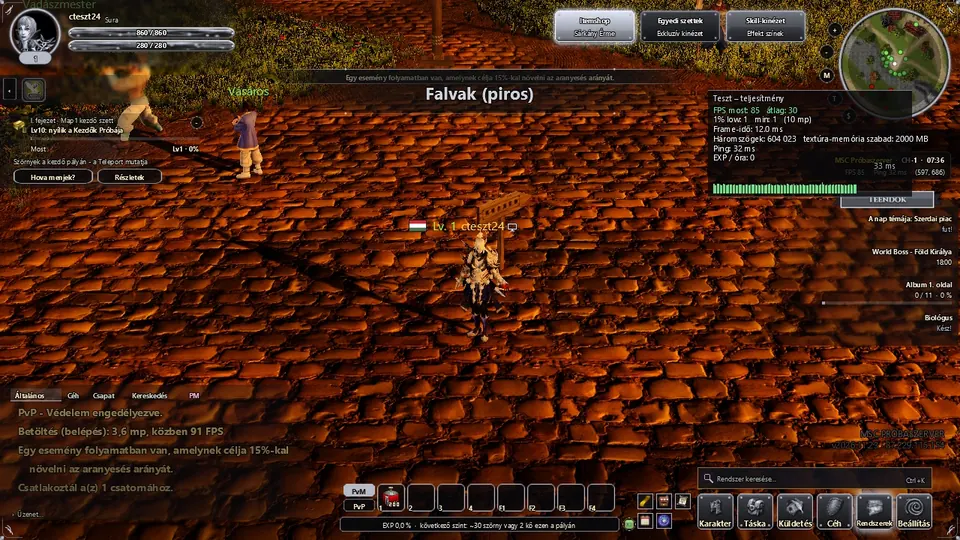
A clear screen with colour-coded signalsThe new HUD is cleaner: important values are colour-coded, and Item shop, Unique sets and Skill appearance moved into the Systems menu, leaving more room for the game.
Players can choose their own skill look for every class, with a live 3D preview – the same skill, a different color and mood.
Tip: Skill appearance moved into the Systems menu; with the All skill effects button in the Test menu you see the looks at once.

The new HUD is cleaner: important values are colour-coded, and Item shop, Unique sets and Skill appearance moved into the Systems menu, leaving more room for the game.

Click the MSC shield in the top right corner and every test opens in one window: protection, measurement, load, simulators, visuals and character. No commands to remember – one click and it runs.
The base price includes the FreeBSD server and the Windows 64-bit DX11 client. Further platforms arrive as separate add-ons.
We will let you know as soon as they are available – subscribe to the newsletter.
The product keeps evolving – here you can see the changes.
Loading…
Yes, the skill look is visible to everyone nearby.
Yes, unlocking looks can be tied to an itemshop item or an in-game reward.
Yes, you can see it in action on the test server. There is no trial license; the license you buy stays in your account, assigned to your server.
No: after purchase we do not refund the fee, not even proportionally. That is why it is worth trying it on the test server first.
Choose what you need, pay with PayPal or bank card, and we install it.