
MSCMODULAR SERVER CREATORBUILD YOUR SERVER. YOUR WAY.
Home / Systems / Autofarm interface
Game system
Add-on – can be requested on the websiteCan be tried on the test server

Autofarm interface

A clear autofarm window opened from an item, with a time allowance and statistics – the player sees what they achieved, and the server keeps control of the time.

Game systems
TRY IT NOW

Autofarm interface on the test server

  1. Download the MSC Launcher and log in to the test server – the Ready character button instantly gives you a Lv120 or Lv250 character.
  2. Click the MSC shield in the top right corner, open the Systems panel and search (Ctrl+K) for “Autofarm interface”.
  3. Press Show me!: a short tour, then the system opens in the game.

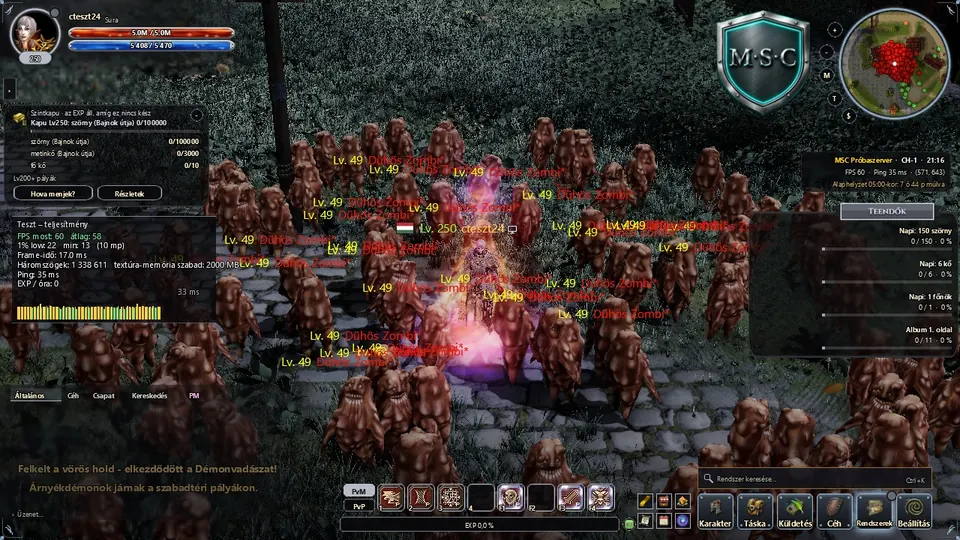
Tip: Switch on auto hunting, then use the Crowd 200 button in the Test menu to see how it works among many monsters.

Show me! system tour
1000-monster crowd test
NEW

1000-monster crowd test

Above 50 FPS with 1000 mobs

The load test spawns 1000 monsters around your character at once. With GPU animation the 64-bit DX11 client stays above 50 FPS even then – the FPS meter stays on screen the whole time.

Systems panel with search
NEW

Systems panel with search

Ctrl+K – any system in one search

All systems on one panel with search (Ctrl+K). Switch them on or off and open them; it is marked what belongs to the base package (green) and what is an add-on (yellow).
Autofarm interface

What can it do?

  • Start, stop, settings in one window
  • Display of time, EXP gained and drops
  • Time allowance, extendable with an item
  • VIP extension option
  • A clear, modern interface

What do you get?

  • The system's complete file package (server- and client-side parts, quest and database changes where needed)
  • A detailed, step-by-step installation guide
  • A lifetime license key bound to your server (domain/IP)
  • 30 days of free bug fixing for the system's own errors
  • Download of released updates from your account

What is not included?

  • Installation – can be requested separately (+30%), free with the Starter package
  • Server operation, hosting, backup
  • Custom adaptation tailored to your server (can be requested with a Bug-fix allowance or a custom quote)
  • Graphics elements, models and maps that are not part of the description
  • Refund – not even proportionally after purchase

Requirements

  • Your server source (game/db) and your client source for the integration
  • We agree on compatibility on Discord before purchase – and on the test server you can try it in action
  • The license applies to one live server and its test server

In a package

Platform add-ons

The base price includes the FreeBSD server and the Windows 64-bit DX11 client. Further platforms arrive as separate add-ons.

Windows server versionComing soon
Android add-onComing soon
iOS / Mac add-onComing soon

We will let you know as soon as they are available – subscribe to the newsletter.

Update log

The product keeps evolving – here you can see the changes.

Loading…

Frequently asked questions

Can the autofarm time be limited?

Yes, it works with a time allowance that can be extended with an item or VIP.

Can I try it before buying?

Yes, you can see it in action on the test server. There is no trial license; the license you buy stays in your account, assigned to your server.

Is there a refund?

No: after purchase we do not refund the fee, not even proportionally. That is why it is worth trying it on the test server first.

Preparing to launch? Put together your own package.

Choose what you need, pay with PayPal or bank card, and we install it.